AI coding usage meter · macOS menu bar app
Your remaining usage, in the menu bar
Burndown shows the 5-hour session and weekly limits of your Claude Pro or Max plan as a percentage and the time left until reset. It also shows when you will hit a limit at the current pace, and which Claude Code session is waiting for your approval.
macOS 14 or later · Apple Silicon and Intel · Requires Claude Pro or Max


Features
One line in the menu bar, the full picture one click away
01
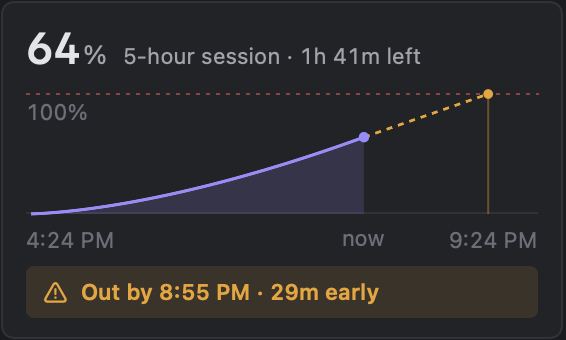
Burndown chart: when you will run out
A solid line shows what you have used in the 5-hour window, and a dotted line extends it at the current pace. If the dotted line reaches 100% before the reset, it says so ahead of time, like Out by 8:18 PM · 29m early. If you have room, it says that instead.
02
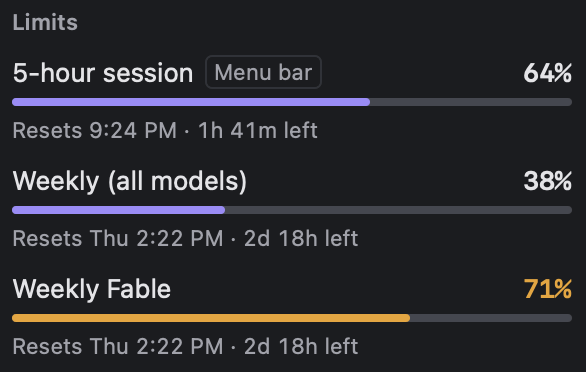
Three limits, each on its own
The 5-hour session, the weekly total and the per-model weekly limit each get a gauge. Gauges turn orange above 70% and red above 90%, with the reset time and time left underneath.
A Mac notification arrives when you pass your threshold (80% by default) or are about to run out.
03
Percentage and time to reset in the menu bar
The limit you pick shows as 64% 1h42m. The 5-hour session counts down as 1h42m and weekly limits as 2d18h, so the unit tells you which one you are looking at.
A ! appears when a limit you did not pick passes 90%, and a ? when a session needs you.



04
Claude Code session monitoring
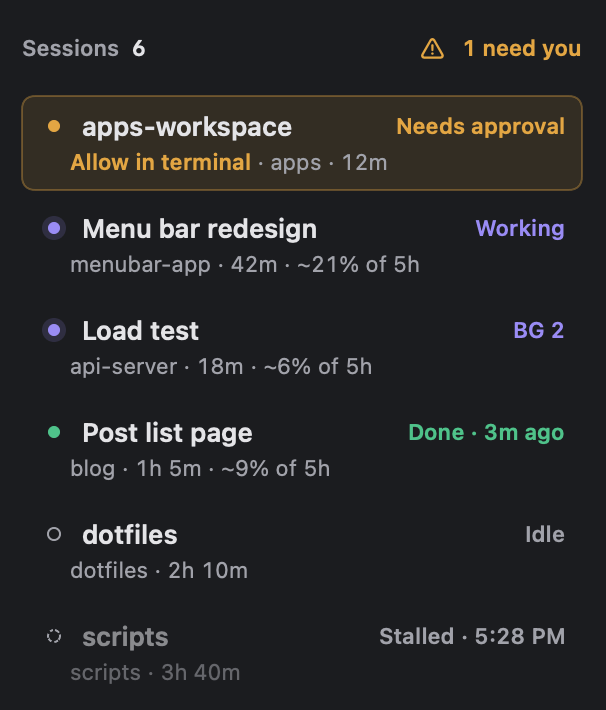
Each session gets one line: working, needs approval, waiting for an answer, or done. You get a Mac notification when a session needs approval or an answer, and when it finishes.
It is off by default. Turning it on in Settings adds 7 hooks to ~/.claude/settings.json and keeps a backup of the original file. Click Remove to undo it.
05
Weekly report
A week of daily 5-hour peaks, the days you hit a limit, and your average peak.
Connect your .claude folder to add Claude Code session counts, lines added and removed, and usage by project.

Privacy
Where your data goes
There is no developer server, and the app has no advertising, analytics or tracking code.
Usage
Travels only between this Mac and Anthropic's servers. Only the percentages and times the chart and report need are saved on this Mac.
Sign-in
Stored only in your Mac's Keychain. The sign-in saved by Claude Code is read only after you allow it.
Session events
Hooks send events only to 127.0.0.1 on this Mac, and requests without the app's token are rejected. The app keeps only states such as working or done in memory, and never stores or sends conversations or commands.
Install
Get Burndown
Mac App Store
The easiest option for most people. The App Store handles updates.
First launch
A window asks how to connect. If you use Claude Code, allowing Keychain access once is enough. Otherwise, sign in to your Claude account in the browser. You can also look around with sample data and no account.
Requirements
macOS 14 or later, Apple Silicon or Intel. Loading usage requires a Claude Pro or Max subscription.
Stuck installing or connecting? See Support.